



THE GAME
WHAT YOU NEED
What you need to ride Pedal Mania, and what can join in.
WHAT IT IS
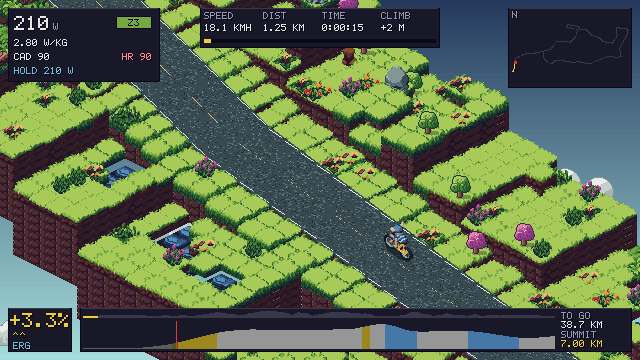
A smart trainer and a screen are all you need. Your watts move your rider, and the road pushes back through the pedals. Your phone, your watch and your handlebars can join in.
HOW TO START
- Get the game for your screen from the download page.
- Wake your trainer and pair it in DEVICES. The first time, the game's setup does this with you.
- Sign in and link the game, so your rides count.
YOUR TRAINER
Pedal Mania talks to smart trainers over Bluetooth: KICKR, Elite, Saris and the others that speak FTMS, Wahoo's own control and Tacx's FE-C. Wahoo trainers with Direct Connect work over Wi-Fi.
- Or use a power meter on your bike, with any trainer. Cadence sensors and heart-rate straps pair too. Your Apple Watch can send your heart rate through Computer instead of a strap. Only one power source counts, so your watts are never counted twice.
- The road's gradient sets the trainer's resistance, so the climbs push back through the pedals.
- TRAINER DIFFICULTY sets how much of a climb you feel, from 0 to 100%, and 50% to start with. It changes how hard the pedals push, never your speed.
- Pair once in DEVICES, and the game finds your trainer again each time it starts.
- No trainer yet? Choose DEMO RIDE when you pair, and a simulated trainer pedals for you. Its rides are kept, but never ranked and never counted against the free 20 km. It needs no account.
- Riding your trainer needs a free account: sign in and link the game. 20 km a month are free, and Pro is unlimited.
- ANT+ isn't supported. A trainer talks to one app at a time, so close any other app that holds it.
HOW A 10% CLIMB FEELS
TRAINER DIFFICULTY50%
DESCENTS ARE HALVED FIRST.
YOUR SCREEN
- MACOS · DOWNLOAD
macOS 13 Ventura or later on Apple silicon, macOS 12 Monterey or later on Intel.
- WINDOWS · DOWNLOAD
Windows 10 or 11, 64-bit, with Bluetooth built in or a USB Bluetooth adapter.
- LINUX · DOWNLOAD
64-bit Linux with BlueZ for Bluetooth.
- APPLE TV · APP STORE
tvOS 26 or later. Ride on the big screen with the Siri Remote, and pair your trainer over Bluetooth or Wi-Fi.
- IPHONE AND IPAD · BETA
iOS or iPadOS 16 or later. One app for both.
- ANDROID · BETA
Android 8 or later.
Every download, and how to install it, is on the download page.
YOUR PHONE AND WATCH
- Computer turns your phone into a bike computer and a remote. It shows your power, heart rate and the climb ahead, your place in a race and your workout's next step.
- At a junction in the open world, it shows a big button for each way you can go.
- Link it with the code the game shows in SETTINGS > ACCOUNT > COMPUTER, or scan the game's QR code.
- With an Apple Watch, Computer sends your heart rate to the game, and the watch saves the ride to Apple Health.
- Computer saves rides from an Apple TV, a Mac or a PC to Apple Health or Health Connect. On an iPhone, an iPad or Android, the game saves them itself.
- Computer is in testing: on TestFlight for the iPhone, with the Apple Watch app, and in Google Play's closed test for Android. How to join.
YOUR BARS
- Handlebar controllers that speak OpenBikeControl pair over Bluetooth or Wi-Fi, as many as you like. They shift gears, hold your watts and turn you round. They also pause the ride and change the camera, the HUD and the map.
- VIRTUAL GEARS gives you 24 gears, and gear 12 feels like the road. Each gear adds a step of gradient, and your speed still comes from your watts. They're off to start with: turn them on in SETTINGS > TRAINER > VIRTUAL GEARS.
- HOLD WATTS: press W, tap your power or press your controller's cruise button, and the trainer holds the watts you're riding. Your shifters, the arrow keys or - and = change them. One press moves 1 W, quick presses jump to the next 5 W, and holding moves 10 W at a time.
- HOW CLOSE sets EXACT (in ERG, to start with), TIGHT (5% either way) or LOOSE (10%). HOLD WATTS works on any ride but a race, a workout, the Lab or an Everest, and lets go under 50 rpm.
- A gamepad (Xbox, PlayStation or MFi) or the Siri Remote plays the whole game. Every key and button is on CONTROLS.